
Issuer Identity Registry
Introduction to the Issuer Identity Registry (IIR)
About the Credential Engine Issuer Identity Registry
The Credential Engine Issuer Identity Registry (IIR) is an open, machine-readable trust infrastructure designed to support verification of organizations that issue digital credentials and qualifications.
As digital, verifiable credentials (VC) become more widely used across education, workforce, and employment ecosystems, the ability to verify the identity of the issuing organization is increasingly important. The registry provides a consistent and efficient method for establishing trusted issuer identity using standards-based, interoperable technologies.
The IIR works alongside the Credential Registry to connect trusted issuer identity information with verified issuer identities, Decentralized Identifiers (DIDs), Credential Transparency Identifiers (CTIDs), and descriptive organizational and credential data. Together, these components support transparent, machine-readable data across credential ecosystems.
JSON Web Tokens (JWTs) are used as the standardized cryptographic format for DID submission, challenge signing, and verifier responses. JWTs enable tamper-evident payloads, digital signature validation, and interoperable trust workflows across decentralized identity and verifiable credential ecosystems.
The registry is designed to:
- Support trusted verification of credential issuers
- Improve interoperability across platforms and systems
- Reduce reliance on manual issuer verification processes
- Support privacy-preserving verification workflows
- Provide an open trust infrastructure aligned with emerging global standards and specifications for verifiable credentials
The IIR is implemented in alignment to open specifications including:
- W3C Verifiable Credentials
- Open Badges 3.0
- OpenID Federation 1.0 - For reference, the most important parts of the specification used are:
- Decentralized Identifiers (DIDs)
- Credential Transparency Description Language (CTDL)
The IIR does not issue credentials, store learner records, or verify individual learning achievements. Its purpose is to provide trusted, verifiable information about organizations that issue credentials.
Additional information about the IIR is available at: https://credentialengine.org/issuer-identity-registry/
Credential Engine’s IIR was informed by collaborative research conducted by Credential Engine and the Digital Credentials Consortium (DCC).
Learn more about the research:
Governance Framework
The Credential Engine IIR operates under a formal Governance Framework that defines the policies, operational requirements, responsibilities, and technical trust principles governing the registry service.
This handbook complements the Governance Framework by providing technical guidance for submitting issuer Decentralized Identifiers (DID) and guidance for verifier applications.
IIR Relationship to Credential Registry
The Issuer Identity Registry (IIR) and the Credential Registry are complementary components of Credential Engine’s broader trust and transparency infrastructure. Together, they support machine-readable issuer verification workflows and linked open data about organizations and credentials.
The Credential Registry stores descriptive organizational and credential data expressed as Credential Transparency Description Language (CTDL) JSON-LD.
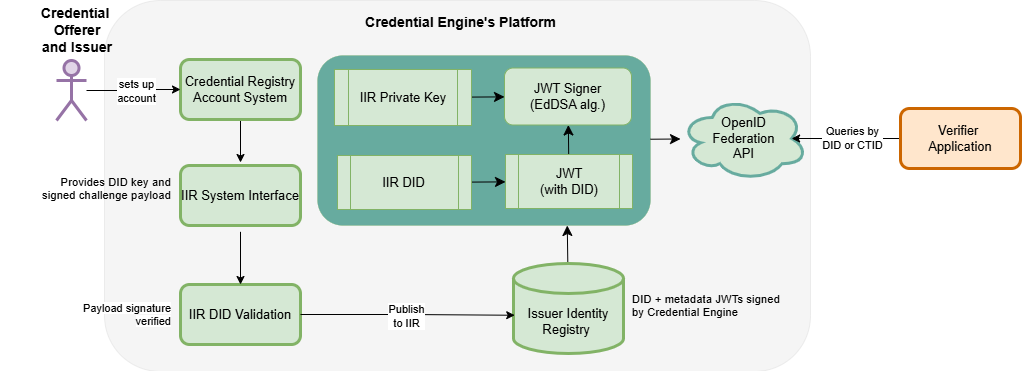
The IIR builds on this foundation by providing verified issuer identity information associated with organizations in the Credential Registry. During DID registration and validation workflows, issuer organizations are authenticated through Credential Engine account and publishing services, and organization metadata is retrieved from the Credential Registry using the organization’s Credential Transparency Identifier (CTID).
After a DID is validated, the system publishes trusted issuer identity metadata to the IIR that includes:
- The validated DID
- Associated DID verification methods
- The organization’s CTID
- Selected organization metadata retrieved from the Credential Registry
This IIR metadata is returned to verifier applications as Credential Engine-signed JSON Web Tokens (JWTs), enabling cryptographically verifiable issuer identity workflows. Whereas, the Credential Registry provides raw CTDL JSON Data graphs.
The relationship between the two registries enables:
- Trusted issuer identity verification
- Machine-readable trust workflows
- Linked connections between issuer identity and credential data
- Reuse of CTDL JSON-LD organizational metadata
- Interoperable verification across decentralized identity ecosystems
Who Should Use This Handbook
This handbook is intended for:
- Issuer organizations participating in the IIR
- Technical administrators managing DIDs and verification methods
- Developers integrating issuer identity verification workflows
- Verifiers and ecosystem partners consuming issuer trust data
- Platform providers supporting verifiable credential ecosystems
Issuer DID Registration and Validation
Getting Started with IIR Registration and Verification
Joining the Issuer Identity Registry (IIR) involves two primary processes:
- Organization onboarding and verification — The onboarding and verification process is intended for organizational administrators and general users responsible for establishing an organization’s participation in the Credential Registry and IIR, IIR onboarding guidance is available at: https://guidance.credentialengine.org/issuer-identity-registry/
- DID submission and validation — The DID submission process is a technical workflow typically completed by a developer or technical staff member responsible for managing the organization’s decentralized identity infrastructure. This handbook covers these topics.
DID Submission and Validation
After the organization onboarding and verification process is completed, the organization may submit one or more Decentralized Identifiers (DIDs) for validation and registration within the IIR.
The DID submission workflow:
- Confirms that the organization controls the DID
- Validates the associated verification method
- Registers the DID within the IIR infrastructure
- Enables machine-verifiable issuer identity
- Registers a Quality Assurance Action in the Credential Registry
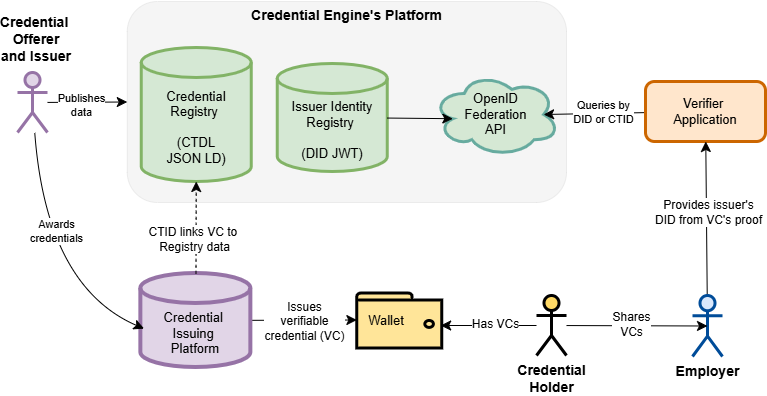
Figure 2: Credential Engine Platform
This figure shows the flow of data with the Credential Engine platform and interactions between credential issuers, credential holders, and employers.
DID Submission Overview
This handbook provides instructions for single DID submission and bulk DID submission.
Credential Engine provides:
- Interface for submitting individual DIDs
- Command Line Interface (CLI) for submitting DID bulk submittal
- Cryptographic challenge specific to the DID submission
- Python script example for creating single or multiple DID JSON Web Tokens (JWTs)
The DID submission process verifies the DID:
- Resolves correctly using a supported DID method
- Association with the organization’s identity and is under the organization’s control
- Signed payload confirms the organization’s authority over the DID
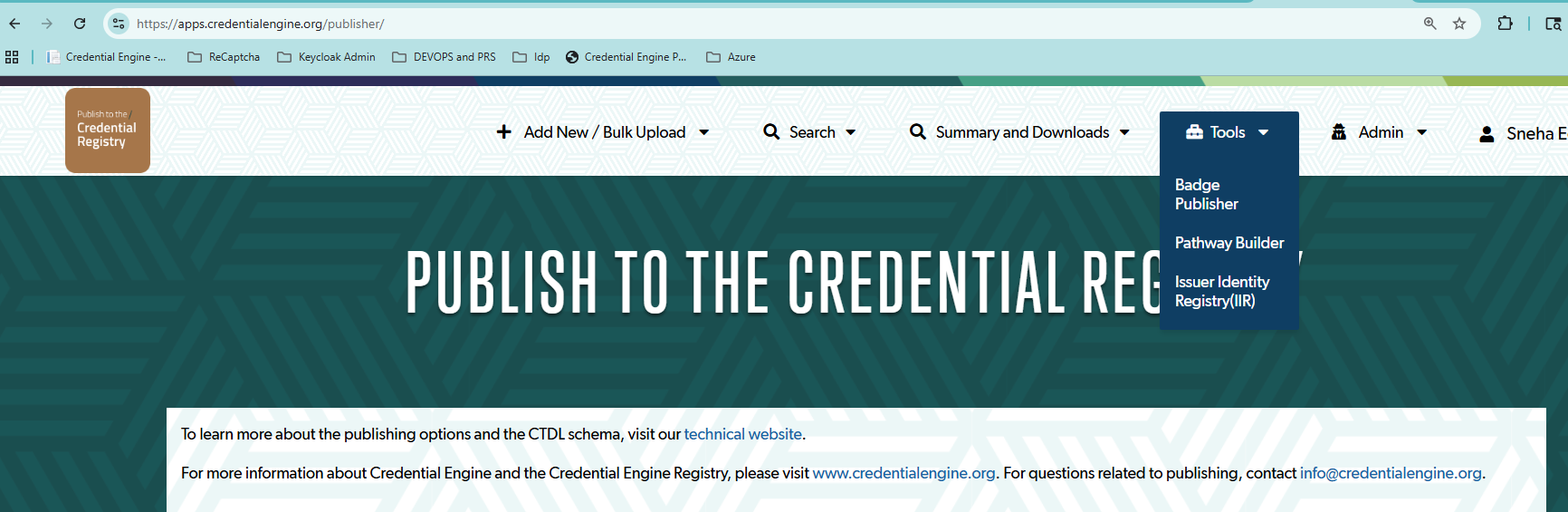
After the organization verification is completed, the DID validation and registration workflow is accessible through the Credential Publisher under the Tools menu.
- Log in to your Credential Engine Publisher
- Navigate to “Tools” and select “Issuer Identity Registry (IIR)”
IIR Dashboard and Organization Selection
The IIR Dashboard displays registered issuers associated with the organizations connected to the authenticated user account.
Organizations approved to participate in the IIR appear within the “My Organizations” section
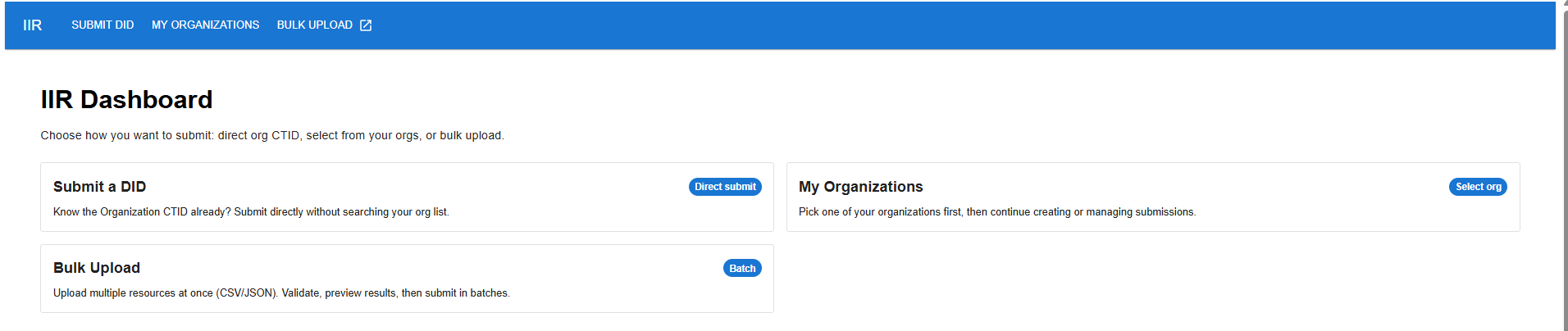
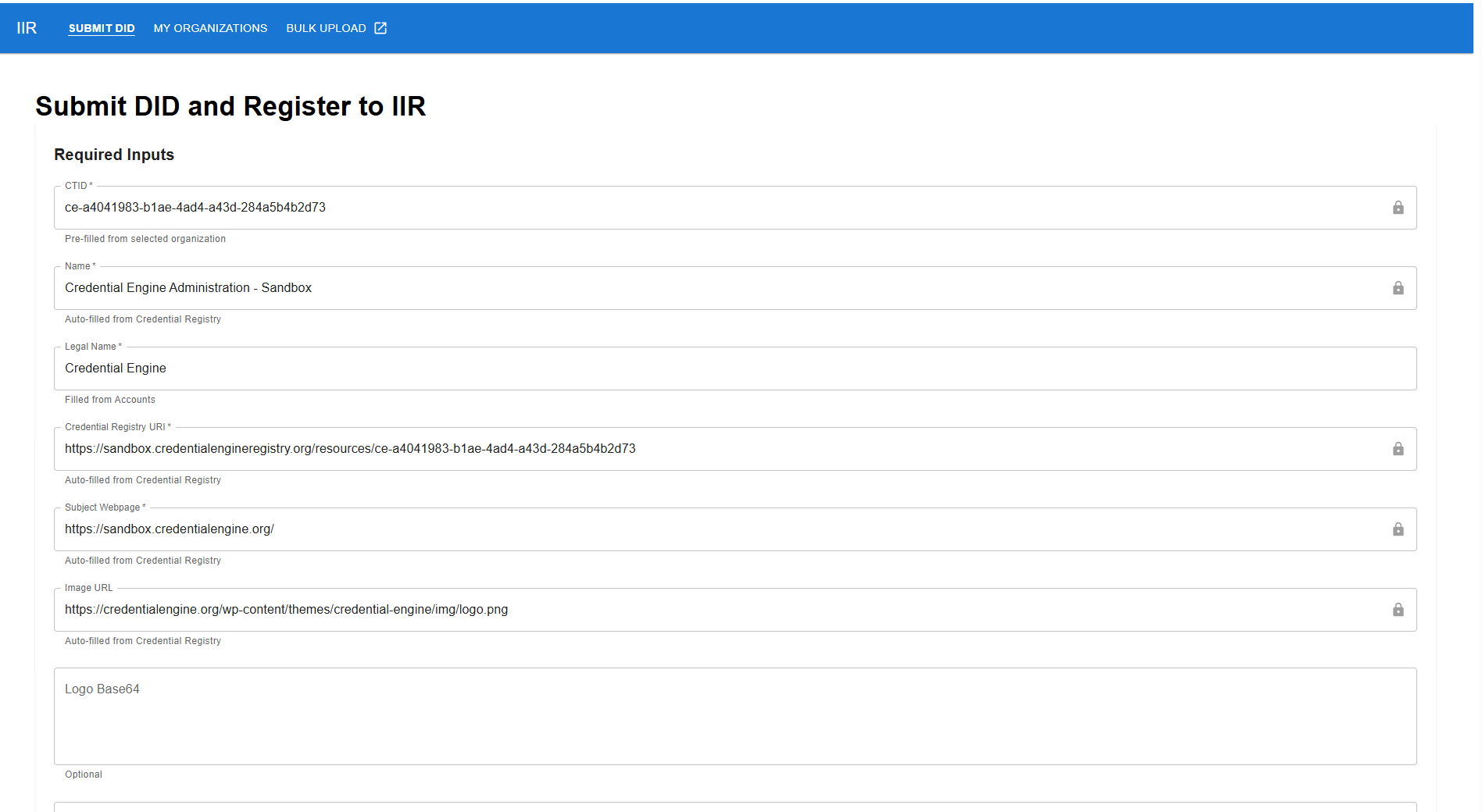
- The user begins by selecting the organization for DID registration.
- Organization information is automatically populated from the Credential Registry and associated account records. Auto-filled data from the Credential Registry includes the following:
| CTDL Properties Retrieved from the Credential Registry: Organization | Description | Format | Required or Optional |
|---|---|---|---|
| ceterms:CTID | Globally Unique Identifier |
String The standard 16 octets of a UUID are represented as 32 hexadecimal (base-16) digits, displayed in five groups separated by hyphens, in the form 8-4-4-4-12 for a total of 36 characters (32 hexadecimal characters and 4 hyphens). When the UUID is prefixed with ce-, there are a total of 34 hexadecimal characters and 5 hyphens for a total of 39 characters. Example: |
Required |
| ceterms:name | The commonly known name of the organization. |
String Example: Credential Engine |
Required |
| ceterms:legalName | Formally registered name of the organization with a governmental or legal authority. |
String Example: Credential Engine, Inc. |
Required |
| ceterms:subjectWebpage | Organizations’ webpage URL. |
Valid URL Example: https://credentialengine.org |
Required |
| ceterms:image | Organizations’ logo image | Optional | |
| Credential Registry URI | This is the URI to the raw data about the issuer organization stored in the Credential Registry. |
https://credentialengineregistry.org/resources/ctid Example: |
Required |
| did:web or did:key | This additional data is not retrieved from the Credential Registry | Required | |
| Logo | Base64 file | Valid Base64 encoding | Optional |
| Valid From date | Valid date format following ISO 8601 (stored as UTC) |
YYYY-MM-DD Example: 2026-05-31 |
Optional |
| Valid Until date | Valid date format following ISO 8601 (stored as UTC) |
YYYY-MM-DD Example: 2030-05-31 |
Optional |
Submit individual DIDs interface
Entering and Resolving DIDs
After selecting the organization, the issuer enters the DID to be registered. The IIR currently supports:
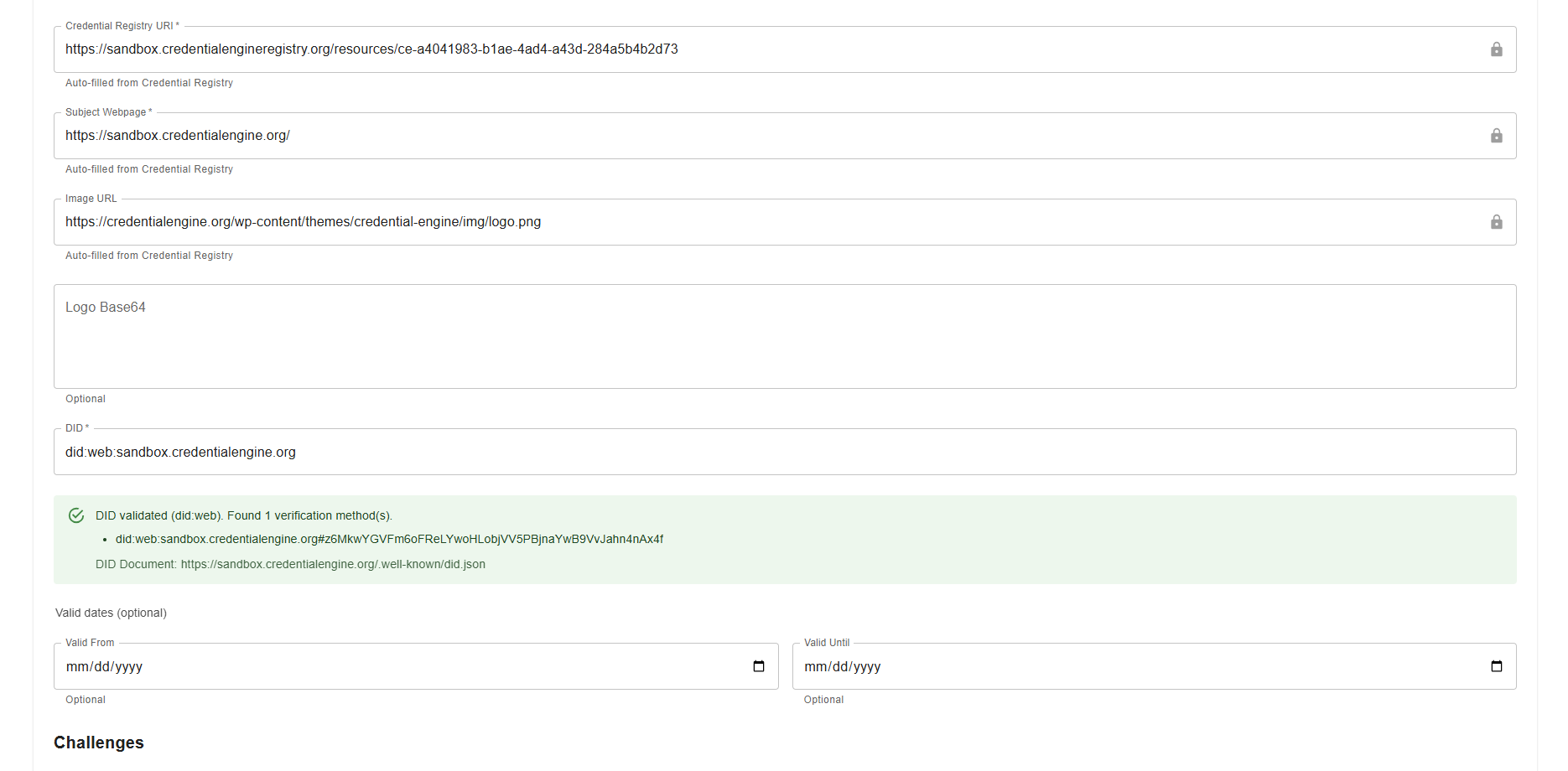
did:web
The did:web method is verified by resolving the organization’s DID Document from its public web domain. Requirements include:
- Public HTTPS availability
- Accessible DID Document
- Valid verification methods
did:key
The did:key method is verified using the cryptographic verification method embedded within the DID. Supported algorithm: Ed25519 (EdDSA).
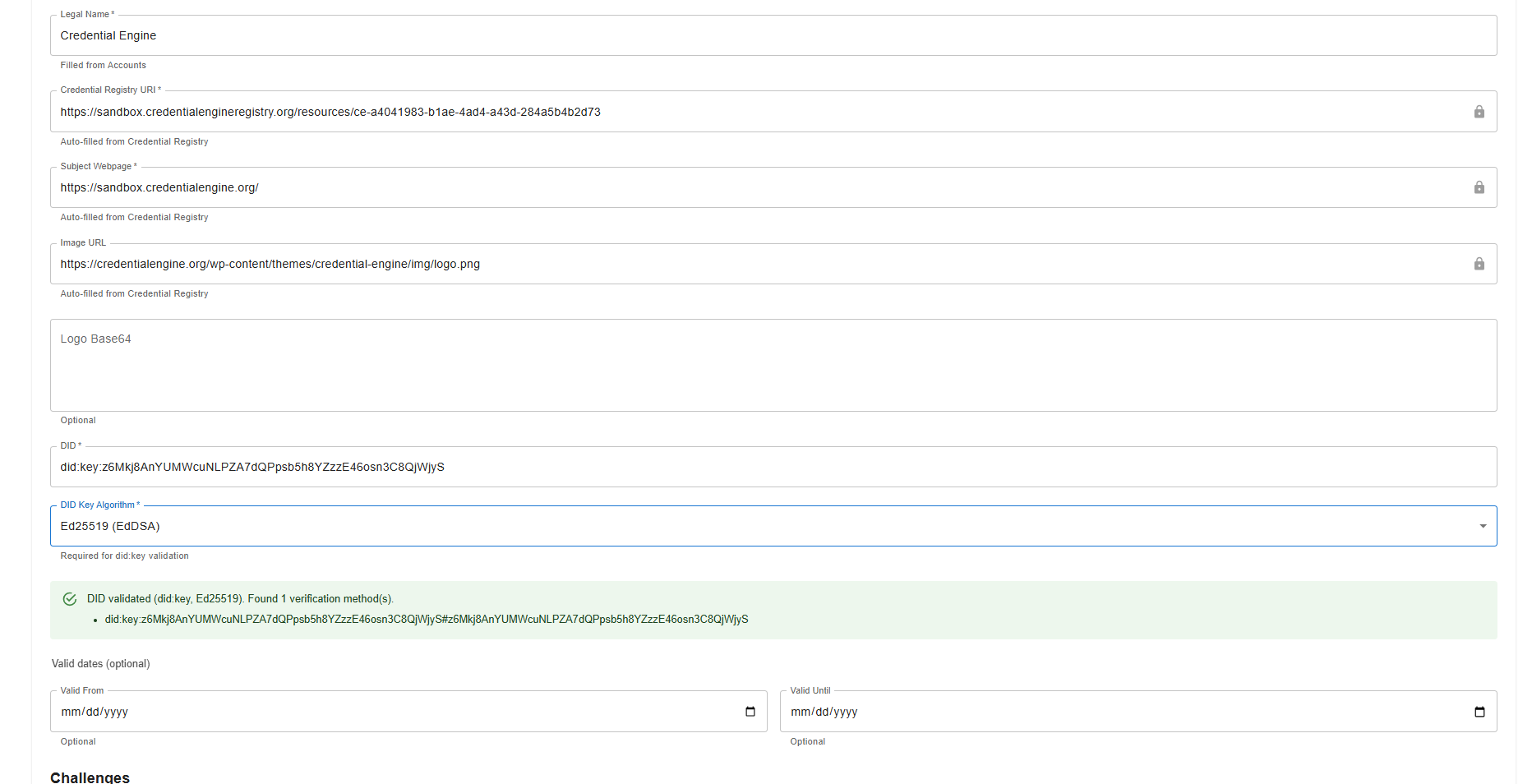
Once a valid DID is entered, the system automatically:
- Resolves the DID
- Retrieves associated verification methods
- Displays available verification methods associated with the DID
-
Validates the DID and shows a success message
- Validated DIDs are published to the IIR and shown on the organization’s IIR dashboard.
-
DIDs that don’t validate show an error:
- The did:web value is invalid.
- The did:key could not be resolved.
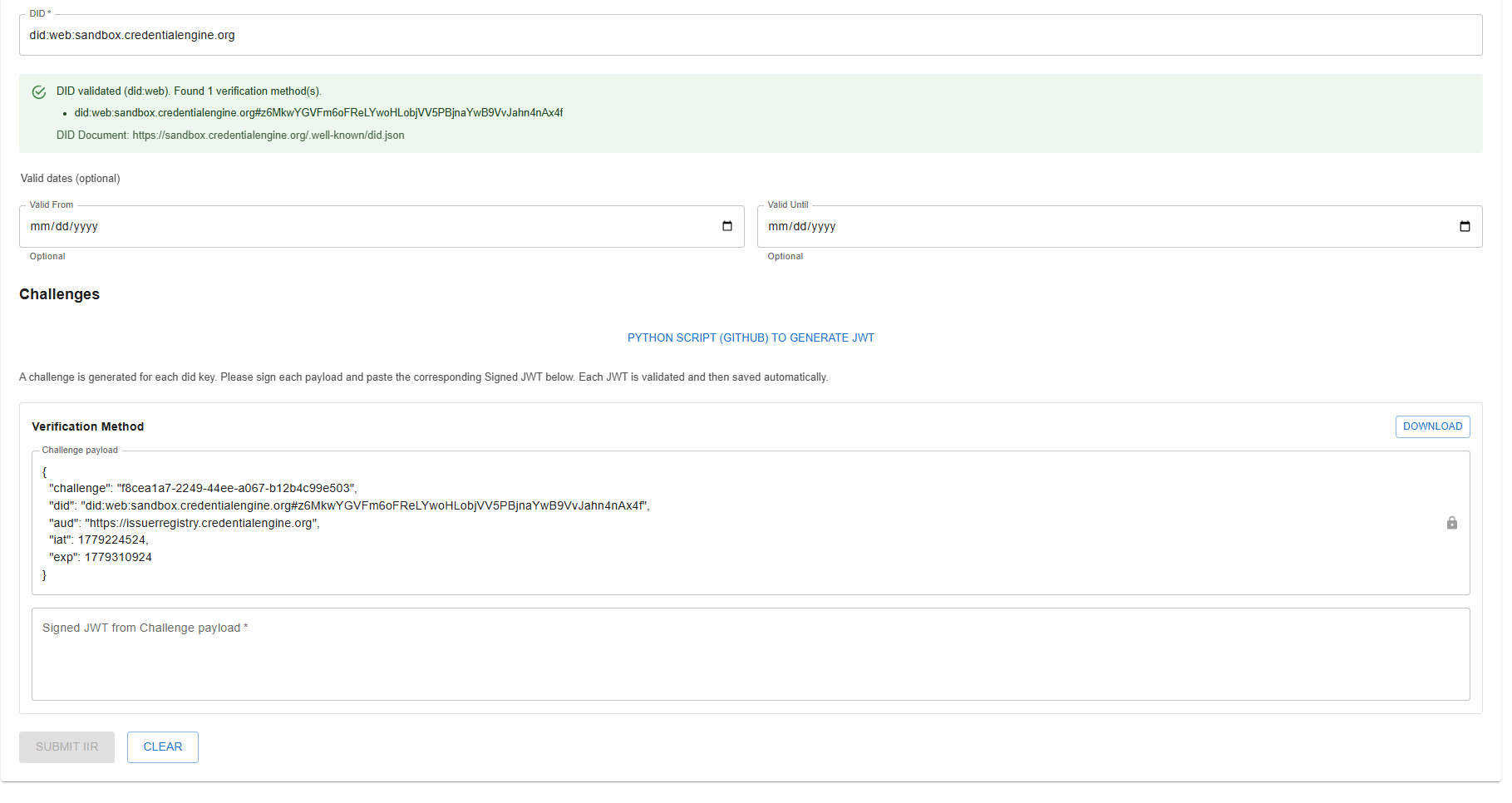
Challenge Generation and Signing Workflow for Individual DID
For each verification method associated with the DID, Credential Engine generates a unique and time-sensitive challenge payload. Initially, challenges are valid for 24 hours. Credential Engine expects to decrease the challenge availability significantly once workflows are established.
Each challenge:
- Is associated with a specific verification method
- Must be signed using the corresponding private key
- Is downloaded as a JSON file for local signing
Only an entity with access to the organization’s private key can correctly sign the generated challenge.
Example challenge payload:
						{
						"challenge": "f8cea1a7-2249-44ee-a067-b12b4c99e503",
						"did": "did:web:sandbox.credentialengine.org#z6MkwYGVFm6oFReLYwoHLobjVV5PBjnaYwB9VvJahn4nAx4f",
						"aud": "https://issuerregistry.credentialengine.org",
						"iat": 1779224524,
						"exp": 1779310924
						}
Signing Individual DID Challenges Locally
Credential Engine provides a Python script that credential issuing organizations can use to sign challenges locally using the issuer’s private keys. Issuer organizations can use their own scripts. Credential Engine provides the Python script as an option.
The signing process:
- Occurs entirely on the issuer’s local machine
- Never transmits private keys to Credential Engine
- Produces signed JWT payloads for submission to the IIR
This reference implementation supports:
- Single DID submissions
- JWT generation
- Verification method selection
- Local signing workflows
GitHub single DID signing Python script: https://github.com/CredentialEngine/Transformations-CTDL/tree/main/IIR
JWT Header Requirements
The JWT header must include:
- typ= JWT
- alg = supported signing algorithm
- kid= DID verification method identifier
Example JWT header:
{
 "alg": "EdDSA",
 "kid": "did:key:z6Mkj8AnYUMWcuNLPZA7dQPpsb5h8YZzzE46osn3C8QjWjyS#z6Mkj8AnYUMWcuNLPZA7dQPpsb5h8YZzzE46osn3C8QjWjyS",
 "typ": "JWT"
}
JWT Payload Requirements
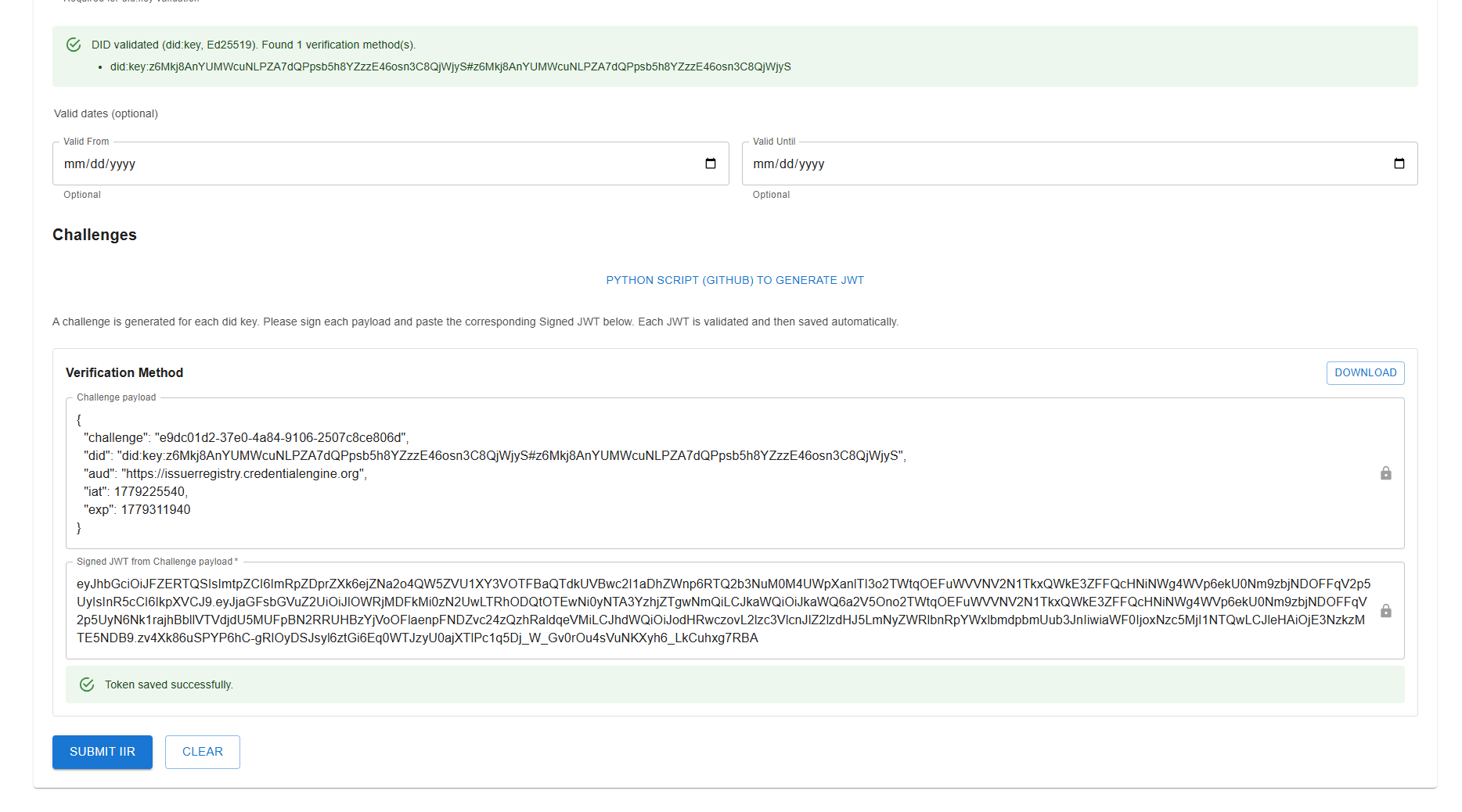
The JWT payload must match the challenge payload generated by Credential Engine.
Example payload:
{
  "challenge": "e9dc01d2-37e0-4a84-9106-2507c8ce806d",
  "did": "did:key:z6Mkj8AnYUMWcuNLPZA7dQPpsb5h8YZzzE46osn3C8QjWjyS#z6Mkj8AnYUMWcuNLPZA7dQPpsb5h8YZzzE46osn3C8QjWjyS",
  "aud": "https://issuerregistry.credentialengine.org",
  "iat": 1779225540,
  "exp": 1779311940
}
Signed JWT Example
Example signed challenge JWT:
eyJhbGciOiJFZERTQSIsImtpZCI6ImRpZDprZXk6ejZNa2o4QW5ZVU1XY3VOTFBaQTdkUVBwc2I1aDhZWnp6RTQ2b3NuM0M4UWpXanlTI3o2TWtqOEFuWVVNV2N1TkxQWkE3ZFFQcHNiNWg4WVp6ekU0Nm9zbjNDOFFqV2p5UyIsInR5cCI6IkpXVCJ9.eyJjaGFsbGVuZ2UiOiJlOWRjMDFkMi0zN2UwLTRhODQtOTEwNi0yNTA3YzhjZTgwNmQiLCJkaWQiOiJkaWQ6a2V5Ono2TWtqOEFuWVVNV2N1TkxQWkE3ZFFQcHNiNWg4WVp6ekU0Nm9zbjNDOFFqV2p5UyN6Nk1rajhBbllVTVdjdU5MUFpBN2RRUHBzYjVoOFlaenpFNDZvc24zQzhRaldqeVMiLCJhdWQiOiJodHRwczovL2lzc3VlcnJlZ2lzdHJ5LmNyZWRlbnRpYWxlbmdpbmUub3JnIiwiaWF0IjoxNzc5MjI1NTQwLCJleHAiOjE3NzkzMTE5NDB9.zv4Xk86uSPYP6hC-gRlOyDSJsyl6ztGi6Eq0WTJzyU0ajXTlPc1q5Dj_W_Gv0rOu4sVuNKXyh6_LkCuhxg7RBASubmitting Signed Individual JWTs
After signing challenges locally, the issuer pastes each signed JWT into the corresponding field within the IIR submission interface.
As each JWT is submitted:
- The system validates the signature
- Verification status is displayed immediately
- Successfully validated JWTs are automatically saved by the system
After final submission:
- The DID is registered within the IIR along with the issuer organization data retrieved from the Credential Registry
- The validated issuer DID, along with the issuer organization data retrieved from the Credential Registry, is available through the IIR endpoints
DID Validation
The IIR validates each DID submission by:
- Resolving the DID
- Retrieving verification methods
- Verifying JWT challenge signatures
- Validating timestamps
Validation behavior includes:
- did:web → DID Document retrieval through HTTPS
- did:key → Public key derivation directly from DID values
If validation succeeds:
- The issuer DID and verification method are registered in the IIR
- Validity windows are stored
- The issuer becomes available through IIR endpoints
If validation fails:
- Validation errors are returned
- Invalid submissions are rejected
- Errors must be corrected before registration can proceed
Bulk DID Submissions
Use the CLI to support bulk DID submissions.
Select “Bulk Upload” from the organization’s IIR Dashboard. This directs the user to the GitHub script:
GitHub CLI: https://github.com/CredentialEngine/ce-cli
The GitHub repo provides instructions to run a Command Line Interface locally. For installation instructions, command documentation, and CSV format specifications, refer to the CLI documentation.
GitHub CLI README: https://github.com/CredentialEngine/ce-cli/blob/main/README.md
The CLI supports:
- Bulk challenge generation
- Local signing workflows
- Batch DID registration
- CSV-based submission management
A typical workflow is a 3-part process:
- Login
- Sign challenges and generate tokens
- Validate token and publish to IIR
ce login
ce iir bulk-upload-dids sign-challenges --csv input.csv
ce iir bulk-upload-dids publish --output-file Output-input-....csv
The CLI validates:
- CTIDs
- DID formats
- Verification methods
- Signing algorithms
All signing operations occur locally on the issuer’s machine. Private keys are never transmitted to Credential Engine.
Security Considerations
Verifier Instructions and API Endpoints
Browser Access and CORS
The Issuer Identity Registry's OpenID Federation (OIDFED) endpoints are server-to-server APIs. They do not support Cross-Origin Resource Sharing (CORS), so browser-based applications cannot call them directly. The OpenID Federation specification does not require CORS. It is intentionally disabled because these endpoints are designed for backend consumption.
Browser app calls OIDFED directly
Browser app > OIDFED (cross-origin, disallowed)Opening the URL in the browser address bar
Browser address bar > OIDFED (same-origin, allowed)Backend server calls OIDFED
Browser > BFF (same-origin, allowed)
BFF > OIDFED (allowed)If your application runs in the browser, fetch registry data from your backend and expose it to your front end through your own API.
Overview for Verifiers
The IIR provides public endpoints for verifier applications to retrieve trusted issuer identity information. The primary verifier workflow is to query the IIR using an issuer DID and receive a Credential Engine-signed JSON Web Token (JWT) containing metadata about the verified issuer. The JWT format is used to provide a cryptographically signed and tamper-evident response that verifiers can independently validate using Credential Engine’s published trust metadata and public signing keys. The verifier decodes and validates the JWT returned by the IIR. Successful validation confirms that the issuer metadata was signed by Credential Engine and has not been altered.
The IIR supports verifier workflows by providing:
- Public trust anchor endpoint
- List of registered issuer DIDs endpoint
- Issuer DID lookup endpoint that returns a Credential Engine-signed JWT
All of these endpoints are open and available to verifier applications via Swagger.
Access Credential Engine’s IIR Swagger: https://issuerregistry.credentialengine.org/swagger/index.html
The IIR does not verify individual credentials, learner achievements, or credential contents. It provides trusted issuer identity metadata that verifiers can use as part of their broader credential verification process.
Verifier Workflow
A typical verifier workflow includes:
- Extract the issuer DID from a digital credential’s proof.
- Query the IIR issuer OpenID Federation endpoint using that DID.
- Receive a Credential Engine-signed JWT from the IIR.
- Decode the JWT to retrieve issuer metadata.
- Validate the JWT signature using Credential Engine’s published trust anchor information.
- Confirm that the issuer DID in the JWT matches the DID referenced in the credential.
- Review any DID validity period information included in the JWT metadata.
- Use the returned issuer metadata to support the verifier’s credential trust decision.
OpenID Federation Endpoints
The Issuer Identity Registry (IIR) exposes public OpenID Federation endpoints that allow verifiers, wallets, platforms, and other ecosystem participants to retrieve trusted issuer identity metadata.
Supported endpoints include:
- Trust Anchor’s Entity Configuration endpoint
- Issuer List endpoint
- Issuer DID Fetch endpoint
The Entity Configuration and Issuer DID Fetch endpoints return Credential Engine self-signed JWT responses and federation metadata used during issuer identity verification workflows.
Swagger documentation for the OpenID Federation endpoints is available at: https://issuerregistry.credentialengine.org/swagger/index.html?urls.primaryName=OpenID+Federation
Figure 3: DID submission and OpenID Federation API
Trust Anchor’s Entity Configuration Endpoint
The Entity Configuration endpoint provides the foundational trust metadata for the Issuer Identity Registry (IIR). This endpoint publishes the Credential Engine trust anchor information used by verifiers to validate JWTs returned by the IIR issuer DID endpoint.
The Entity Configuration JWT includes Credential Engine’s:
- DID
- CTID
- Public JWK signing key information
- Governance policy URL
Verifiers use this endpoint to establish trust in the Credential Engine-signed JWTs returned by the IIR.
Endpoint:
GET /oidfed/.well-known/openid-federationExample request:
curl https://issuerregistry.credentialengine.org/oidfed/.well-known/openid-federationThe trust anchor metadata enables verifiers to:
- Validate JWT signatures returned by the IIR
- Confirm the JWT was issued by Credential Engine
- Retrieve Credential Engine federation metadata
- Reference governance and operational trust information
- Establish trust chain relationships for OpenID Federation workflows
Verifiers should retrieve the Trust Anchor metadata before trusting JWT responses returned by the issuer DID endpoint.
Issuer List Endpoint
The Issuer List endpoint returns the list of issuer DIDs registered in the IIR.
Endpoint:
GET /oidfed/federation_listExample request:
curl https://issuerregistry.credentialengine.org/oidfed/federation_listVerifiers may use this endpoint to:
- Discover registered issuer DIDs
- Confirm whether a DID appears in the IIR
- Support trust discovery and caching workflows
OpenID Federation Endpoint
The Issuer DID endpoint returns a Credential Engine-signed JWT containing verified issuer metadata for a specific DID. This endpoint can be queried using a DID.
Endpoint:
GET /oidfed/federation_fetch?sub={did}Example request:
curl "https://issuerregistry.credentialengine.org/oidfed/federation_fetch?sub=did:key:z6Mkj8AnYUMWcuNLPZA7dQPpsb5h8YZzzE46osn3C8QjWjyS"The verifier decodes the returned JWT to access the issuer metadata. The verifier should also validate the JWT signature to confirm that the response was issued by Credential Engine and has not been modified.
JWT Returned by the Issuer DID Endpoint
The JWT returned by the issuer DID endpoint is signed by Credential Engine.
It contains verified issuer metadata including the data shown in the chart below.
It’s used to provide a tamper-evident issuer identity response. If the JWT signature cannot be validated, the verifier should not treat the response as trusted.
| Metadata | Description | Format | Required or Optional |
|---|---|---|---|
| DID’s valid from date | Valid date format following ISO 8601 (UTC) |
YYYY-MM-DD Example: 2026-05-31 |
Optional |
| DID’s valid until date | Valid date format following ISO 8601 (UTC) |
YYYY-MM-DD Example: 2030-05-31 |
Optional |
| Issuer organization’s Credential Registry URI | The URI to the raw data about the issuer organization formatted as CTDL JSON-LD and stored in the Credential Registry. |
https://credentialengineregistry.org/resources/<ctid> Example: https://credentialengineregistry.org/resources/ce-9bd8c615-9f3c-40e6-9c20-6d9f811844e6 |
Required |
| Issuer organization’s CTID | Globally Unique Identifier |
String The standard 16 octets of a UUID are represented as 32 hexadecimal (base-16) digits, displayed in five groups separated by hyphens, in the form 8-4-4-4-12 for a total of 36 characters (32 hexadecimal characters and 4 hyphens). When the UUID is prefixed with ce-, there are a total of 34 hexadecimal characters and 5 hyphens for a total of 39 characters. Example: ce-e8a41a52-6ff6-48f0-9872-889c87b093b7 |
Required |
| Issuer organization’s legal name | Formally registered name of the organization with a governmental or legal authority. |
String Example: Credential Engine, Inc. |
Required |
| Issuer organization’s logo (URL) | Organization’s logo image URL |
Valid logo URL Example: https://b2961752.smushcdn.com/2961752/wp-content/uploads/2022/09/Credential-Engine-White.png |
Optional |
| Issuer organization’s logo (file) | Base64 file for the organization’s logo. | Valid Base64 encoding | Optional |
| Issuer organization’s name | The commonly known name of the organization. |
String Example: Credential Engine |
Required |
| Issuer organization’s subject webpage | Organization’s webpage URL. |
Valid URL Example: https://credentialengine.org |
Required |
Issuer’s did:web or did:key |
Issuer’s validated DID | String | Required |
Decoding and Validating the JWT
Verifier systems should perform two related actions:
- Base64 decode the JWT to read the issuer metadata.
- Validate the JWT signature to confirm the metadata was signed by Credential Engine.
Decoding alone is not sufficient for trust. A verifier must also validate the signature using Credential Engine’s trust anchor metadata.
For manual verification, any user may use https://jwt.io tools to verify signatures of the JWTs returned from the OpenID Federation endpoints using the public JWK present inside it.
Verifier validation should confirm the following:
- JWT was signed by Credential Engine
- JWT has not been altered
- JWT has not expired, if expiration claims are included
- Issuer DID in the response matches the DID requested
- Any DID validity window returned in the metadata is appropriate for the credential being evaluated
Error Handling
If the requested DID is not registered, invalid, unsupported, or cannot be resolved, the endpoint returns an error response rather than a trusted issuer JWT. Verifier systems should handle the following errors.
Registry Resource Errors
- A CTID is required to continue.
- Returned when the request does not include a CTID.
- No matching resource was found in the Credential Registry.
- Returned when the requested resource cannot be found.
- There was a problem retrieving the registry resource. Please try again.
- Returned when a conflict occurs while looking up the resource.
- Unable to load registry data at this time.
- Returned when an unexpected registry error occurs.
did:web Validation Errors
- The provided did:web identifier is invalid.
- Returned when the did:web format is incorrect.
- The did:web document could not be found.
- Returned when the DID document cannot be resolved.
- There was a problem validating the did:web identifier.
- Returned when a validation conflict occurs.
- Unable to validate the did:web identifier.
- Returned when validation fails for an unknown reason.
did:key Validation Errors
- The provided did:key identifier or cryptographic algorithm is invalid.
- Returned when the DID or selected algorithm is not supported.
- The did:key identifier could not be resolved.
- Returned when the DID cannot be resolved.
- There was a problem validating the did:key identifier.
- Returned when a validation conflict occurs.
- Unable to validate the did:key identifier.
- Returned when validation fails for an unknown reason.
Challenge Generation Errors
- Unable to generate verification challenges for this DID.
- Returned when challenge creation fails.
- No verification challenge data could be created.
- Returned when no challenge data is available.
- Verification challenges already exist for this request.
- Returned when a challenge conflict exists.
- Failed to generate verification challenges.
- Returned when challenge generation fails unexpectedly.
JWT Validation Errors
- The submitted JWT is invalid or does not match the verification challenge.
- Returned when the signed JWT cannot be validated.
- No matching verification challenge was found.
- Returned when the related challenge cannot be found.
- The JWT conflicts with the current verification challenge state.
- Returned when the JWT conflicts with an existing validation state.
- JWT validation failed.
- Returned when JWT validation fails unexpectedly.
Token Storage Errors
- The signed JWT token could not be saved.
- Returned when token storage fails.
- The related verification challenge could not be found.
- Returned when the challenge does not exist during token save.
- A signed token has already been submitted for this challenge.
- Returned when a token already exists for the challenge.
- Failed to save the signed JWT token.
- Returned when token storage fails unexpectedly.
Issuer Submission Errors
- Please review the issuer information and try again.
- Returned when issuer details are invalid.
- The issuer submission destination could not be found.
- Returned when the submission target is unavailable.
- This issuer already exists in the Issuer Identification Registry.
- Returned when the issuer has already been registered.
- Unable to submit the issuer at this time.
- Returned when issuer submission fails unexpectedly.
Relationship to Credential Registry: Consuming Data
The IIR provides verified issuer identity metadata retrieved as a JWT signed by Credential Engine. The Credential Registry provides richer descriptive data about organizations and the credentials they own or offer as CTDL JSON-LD — linked, open data. These registries serve different and complementary purposes.
Figure 4
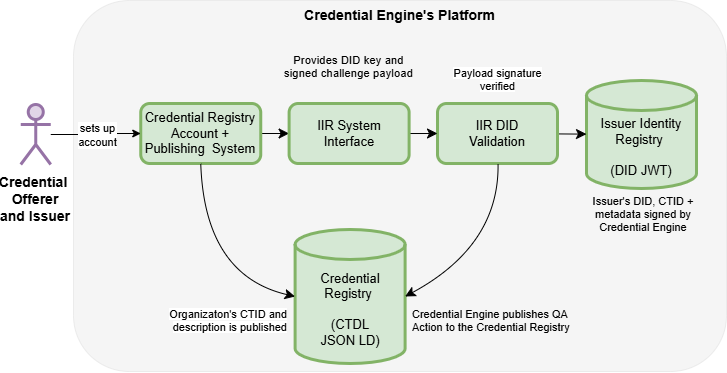
The CTID returned in the IIR metadata links the verified issuer identity record to the corresponding organization record in the Credential Registry.
Verifiers may use the CTID to retrieve or reference CTDL JSON-LD data stored in the Credential Registry:
- Organization descriptions
- Credentials owned or offered by the organization
- Additional linked data
This separation allows the IIR to remain focused on issuer identity verification while the Credential Registry provides descriptive credential and organization data.
When a CTID is known, get a record from the registry directly by CTID. There are three options:
-
Using /envelopes — to return the registry wrapper object that
includes metadata about who published the data and links to previous revisions of that data, along with
the data itself.
https://credentialengineregistry.org/envelopes/{CTID} -
Using /graph — to return the full document and any child entities
such as blank nodes, or competencies for a competency framework, in a flattened array structure.
https://credentialengineregistry.org/graph/{CTID} -
Using /resources — to return only the main document and no child
documents.
https://credentialengineregistry.org/resources/{CTID}
An example URI looks like this:
https://credentialengineregistry.org/resources/ce-a4c0a549-aed3-4704-ade2-e81a5d76865bIn most programming languages, an HTTP GET request is straightforward. For example, to get the data and parse it into an object in C#, you could do this:
using System.Text.Json.Nodes;

public JsonObject GetExample()
{
    var jsonText = new HttpClient()
        .GetAsync( "https://credentialengineregistry.org/graph/ce-a4c0a549-aed3-4704-ade2-e81a5d76865b" )
        .Result.Content.ReadAsStringAsync().Result;
    var jsonParsed = (JsonObject) JsonObject.Parse( jsonText );

    return jsonParsed;
}